System Rotation
Run several of your own systems side by side and automatically trade whichever has performed best lately — switching only while flat.
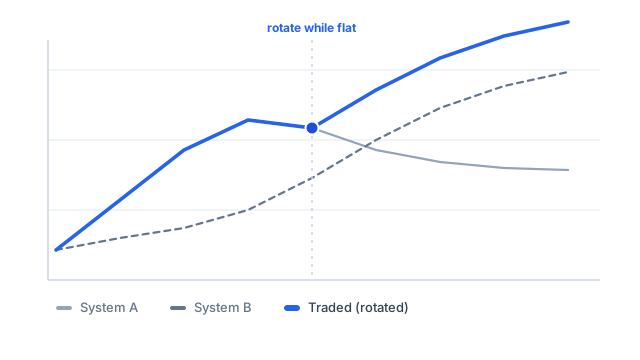
Every trading system works well in some conditions and badly in others. A trend-follower thrives while a stock trends and gives it back when the stock goes sideways; a mean-reversion system is the opposite. Rather than pick one and live with its bad patches, system rotation lets you run several side by side and, at any moment, trade whichever has been doing best lately.
How the Toolbox does it
You hand the RotateSignals functions the buy and sell signals from two or more of your own systems. Behind the scenes each system is back-tested on the current symbol, and at every bar the function looks at how much each one has made over a recent look-back window. It then trades the signals from whichever system has been most profitable over that window, rotating to the hotter system as conditions change. To avoid abandoning a trade mid-position, it only switches while it is flat — never part-way through a holding.
Two to seven systems
There is one function per number of systems, from RotateSignals2 up to RotateSignals7 — the number in the name is how many systems you are rotating between. Each system contributes a Buy/Sell pair of arrays and the final argument is the look-back window, so RotateSignals2 takes two pairs plus the look-back and RotateSignals7 takes seven. You do not assign the result to anything: the function sets the Buy and Sell variables for you to the combined, rotated signals, so the formula can be back-tested directly.
How you would use it
It is a simple, honest way to build a more robust, portfolio-level strategy out of systems you already trust — say a moving-average crossover and an RSI system — letting the better-suited one take over as the market changes. Give each symbol enough history for the look-back window to be meaningful; until it fills, the function simply follows the first system.