Triangle & Wedge Finder
Find ascending, descending and symmetrical triangles, and wedges, as they form.
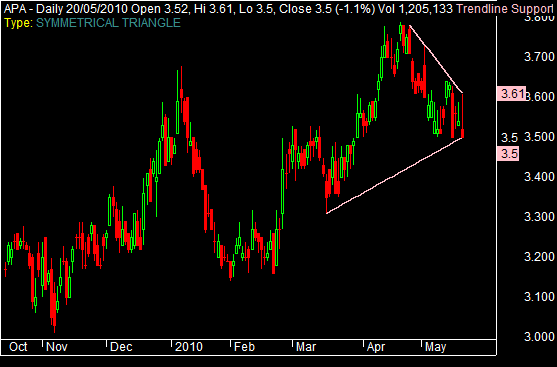
A triangle forms when the price swings get smaller and smaller, so a line drawn over the highs and a line drawn under the lows squeeze toward a point. It usually means the market is winding up, with buyers and sellers in rough balance, and traders watch for the break out of the triangle to show which side has won. A symmetrical triangle has both lines converging, an ascending triangle has a flat top and a rising base, and a descending triangle the reverse. A wedge is the related pattern where both lines slope the same way — a rising wedge often precedes a fall, a falling wedge a rise.
How the Toolbox does it
The finder works by fitting a trendline to the top and the bottom of price at the same time, using the same engine as the Trendline Scanner applied to both edges at once. When both lines qualify it draws the converging pair on the chart and labels the type, so you can see the squeeze before the breakout. It runs as an Exploration over a watchlist or directly on a chart.
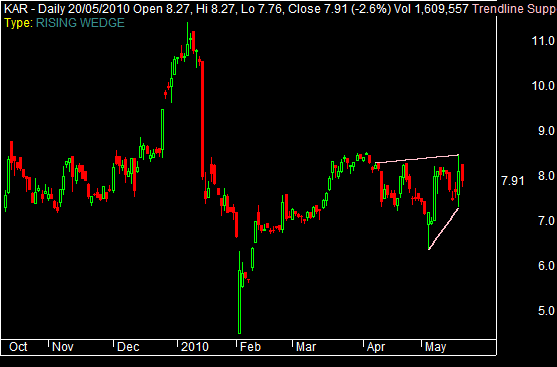
Tuning the search
Because it is built on the trendline engine, the controls are the trendline ones — applied to both edges of the triangle:
- Touch threshold — how close price must come to a line to count as a touch.
- Number of touches and minimum distance between touches — how well-defined each edge has to be.
- Look-back and search periods — how far back and over how many bars the pattern may have formed.